
How to Place an Order with UPI Advance + COD
Pay a small advance (₹300 or ₹500) via any UPI App QR Code to confirm your booking, and pay the remaining balance in cash or UPI when your parcel is delivered at your doorstep.
100% Safe & Verified
Direct bank UPI account
Remaining at Doorstep
Pay courier on delivery
100% Plain Box
Zero mention of contents
15-Min Verification
Instant WhatsApp support
⚡How the Partial Advance System Works in 3 Quick Steps
Select Advance UPI at Checkout
Choose "Pay Advance via UPI QR + COD" as your payment method. The system will calculate your advance (₹300 or ₹500) and remaining COD.
Scan QR & Submit 12-Digit UTR
Scan our official UPI QR with GPay, PhonePe, or Paytm. Submit your 12-digit UTR reference or tap the WhatsApp button to send your receipt.
Discreet Delivery & Balance COD
Our team confirms the order. The parcel is dispatched in a plain, unmarked box. You pay only the remaining balance at delivery.
Add Items to Cart & Proceed to Checkout
Choose products, enter your shipping details, and select payment method.
Advance Calculation Breakdown:
- Cart Total ≤ ₹500: Advance required is ₹300. The remaining balance is collected as COD.
- Cart Total > ₹500: Advance required is ₹500. The remaining balance is collected as COD.
- Free Shipping: Automatically applied on all orders above ₹499!
Scan the Official UPI QR Code
Scan with Google Pay, PhonePe, Paytm, CRED, or any banking UPI app.
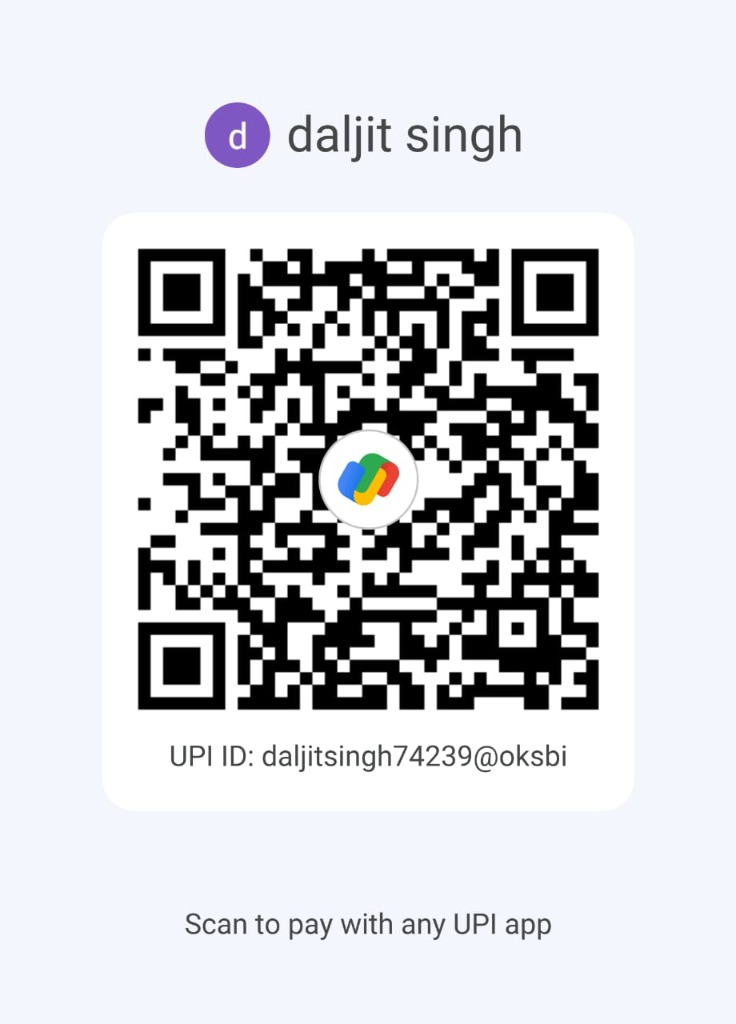
Scan with any UPI app
Google Pay • PhonePe • Paytm • CRED • BHIM
When you scan, ensure the app confirms:
How to Find Your 12-Digit UTR Number
Every UPI app provides a 12-digit transaction ID. Select your app below:
Steps for Google Pay
12-Digit UTR Reference- 1Open Google Pay and tap the "Scan any QR code" scanner icon at the top.
- 2Scan our official QR Code or enter UPI ID daljitsingh74239@oksbi.
- 3Verify the recipient name shows: daljit singh.
- 4Enter the exact payment amount and complete UPI payment with your PIN.
- 5On the "Payment successful" screen, or in "Transaction history", tap on this payment.
- 6Find the 12-digit "UPI Transaction ID" / "Google Transaction ID" (UTR) and tap Copy.
Pro-Tip for Google Pay: In Google Pay, the 12-digit reference number is labeled as "UPI transaction ID". It starts with numbers like 4301... or 4302...
Submit Verification (Website or WhatsApp)
Choose whichever method is easiest and fastest for you.
Submit on Website
Right on your Order Confirmation or Advance Payment page, enter your 12-digit UTR, attach your screenshot, and click "Submit Payment Details".
1-Click WhatsApp Verification
Click the "Send Proof on WhatsApp" button to open our official support chat with your Order ID pre-filled. Send your screenshot directly!
Chat on WhatsApp (+91-7087470539)Your Privacy is Our #1 Commitment
All parcels are shipped in standard, plain brown cardboard boxes or waterproof courier bags. There are zero product photos, zero adult descriptions, and zero mention of "Adult Toys" on the shipping label. The sender address is discreetly listed for logistics only.
Discreet Box
Plain & Untagged
Frequently Asked Questions
Everything you need to know about partial advance payments & delivery.
Need Live Help with Your Payment?
Our confidential customer support team is available on WhatsApp and phone to guide you step-by-step or verify your payment immediately.